

DragFlow hosted telephony — one flowing app for calls, chat, meetings & your whole switchboard.
replaces your office phone system, mobile dialler and meeting platform with one secure desktop & mobile app — provisioned, ported and supported end-to-end by your DragTechies in the UK.
DragFlow demo overview
See it before you switch
Everything your team uses — under one calm, familiar window.
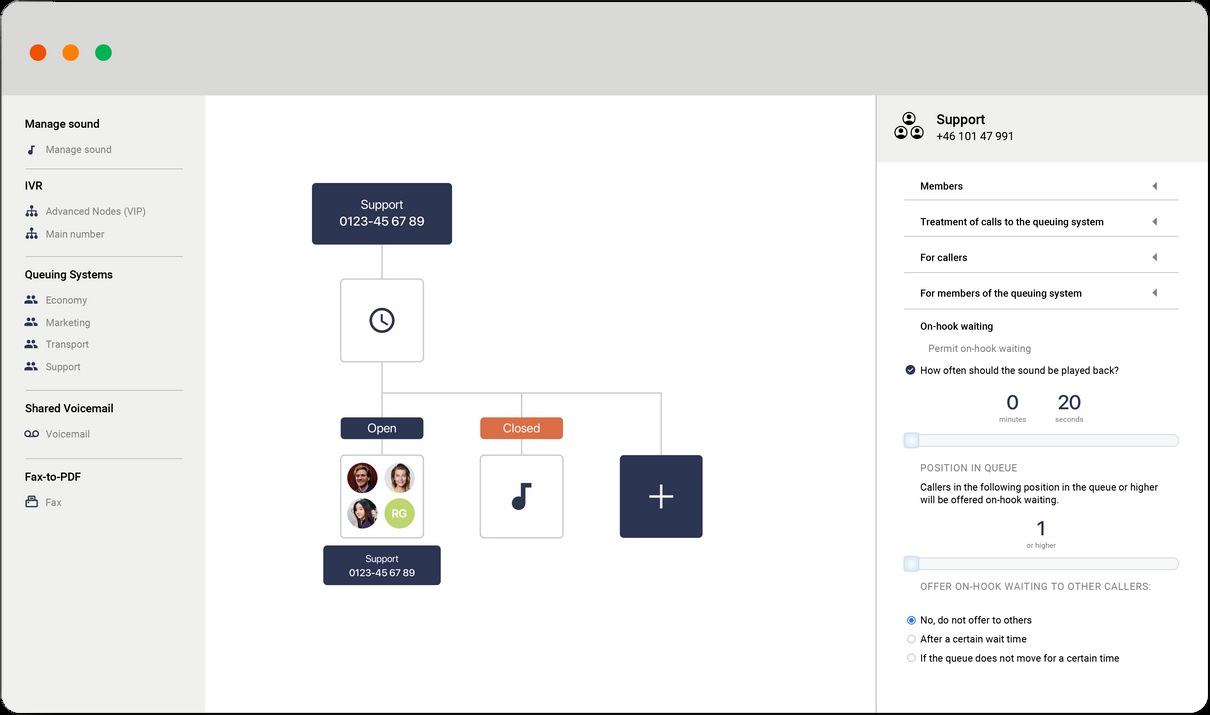
Product screens from our Flow documentation, showing call routing, team administration and mobile contacts. Example details are shown; features depend on your selected solution.
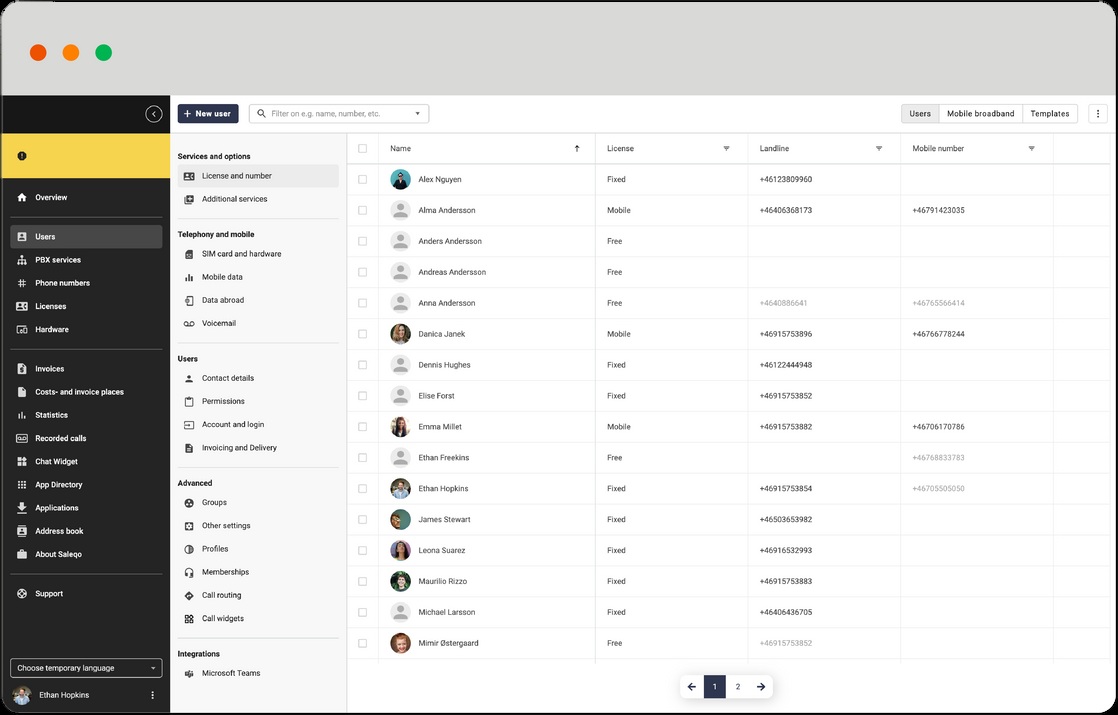
Team administration
Manage your users, numbers and service settings from the administration workspace.
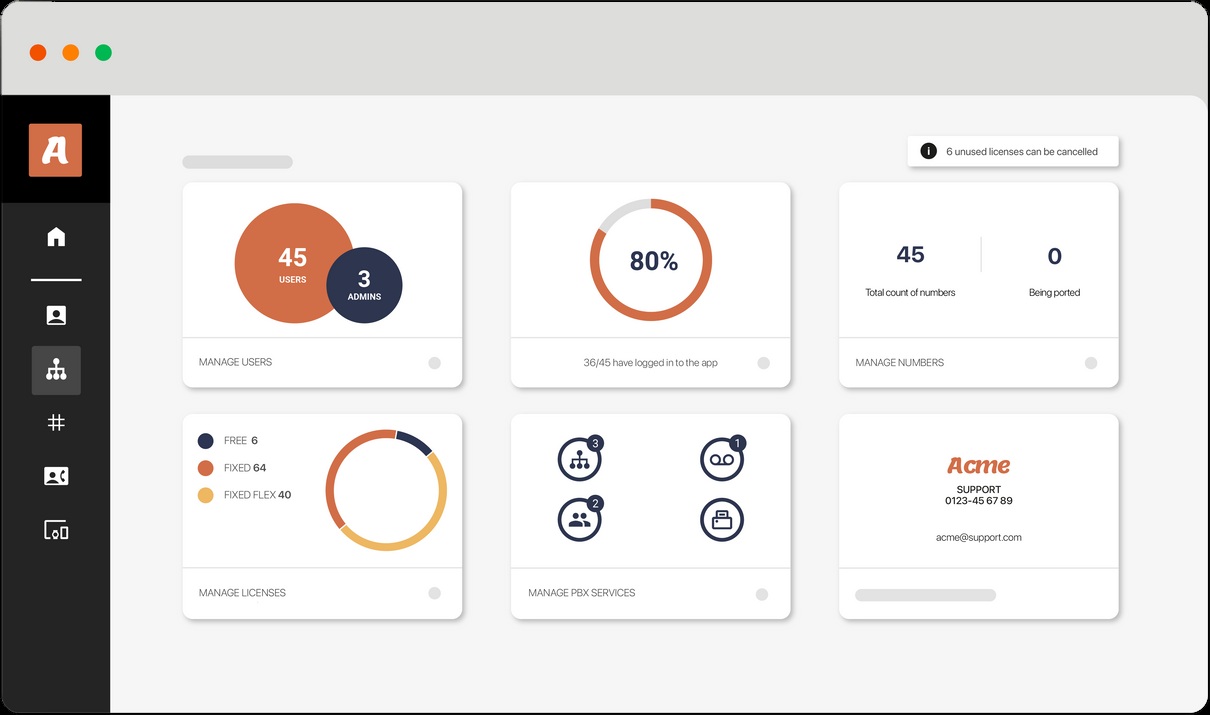
Service overview
Review users, licences, numbers and PBX services in one dashboard.
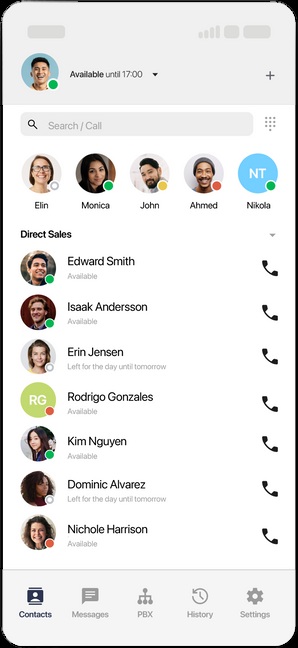
Mobile-ready calling
See colleague availability and contact your team from the mobile app.
Engineering pedigree
The same rigorous design culture behind the seatbelt, Bluetooth, Spotify and the pacemaker — now powering your business communications.
DragAI · Call intelligence
AI call transcripts for your team’s follow-up.
can transcribe your calls automatically. Instead of scribbling notes mid-conversation, your team can review a written record and follow up on what was discussed. Ask us which DragAI transcription options are available for your chosen setup.
Call transcripts
Review a written version of a conversation where transcription is enabled. Check important details against the recording.
Follow-up context
Keep the conversation in view when preparing follow-up notes and agreeing the next steps with your customer.
Conversation records
Discuss how your team needs to access past calls, recordings and transcripts as part of its daily workflow.
Coaching & quality
Managers can review real conversations to train new starters and keep service consistent across the team.
Your recording requirements
Agree access, retention and recording requirements for your organisation before enabling call intelligence.
Review recurring issues
Use conversation reviews to understand repeat questions and improve your team’s customer responses.
Built-in ticket desk
Tickets raised on your hunt groups, tracked to resolution.
With the appropriate Contact Centre package, automatically creates a voice ticket when an operator answers a call from a queue. Tickets can be allocated and followed through alongside operator notes, call recordings and AI transcripts — all in the same window your team takes calls in.
Created when a queue call is answered
When an operator answers a hunt-group queue call, a voice ticket is created automatically with the appropriate package.
Allocated to the right operator
Allocate and track the work across your team rather than leaving follow-up in a personal inbox.
Notes and conversation context
Track tickets alongside operator notes, call recordings and transcripts where those features are enabled.
Customer interactions in view
Use the unified agent view and customer contact history to keep context as work moves between colleagues.
What your team can do with it
- Voice tickets created when queue calls are answered
- Allocate to an operator or a shared team queue
- Operator notes added on and after the call
- Review call recordings where enabled
- Use transcripts where enabled
- Create tickets from incoming messages
- Tag enquiries for analysis and follow-up
- Review customer contact history and unified statistics
Contact Centre features and communication channels depend on the package selected.
Internal Communications & Workflow for UK SMEs
DragFlow is an SME internal communications platform — a hosted phone system, hosted telephony and cloud PBX shaped around how your team works. Tailor IVR menus, hunt groups, call queues and workflow automations to connect customers with the right department. Bring calling into supported CRM and ticketing systems, or use Microsoft Teams integration with the appropriate Microsoft licence.
Tailored Internal Call Flows
We design departmental routing, escalation paths and out‑of‑hours rules around your real internal processes — not a generic template.
Contact Centre & Team Collaboration
A unified agent view brings customer interactions together. Available channels include email, webchat and social messaging, depending on the Contact Centre package.
Microsoft Teams Calling
Direct Routing enables inbound and outbound telephone calls in Teams. Two-way presence sync updates availability across Teams and DragFlow. A suitable Microsoft calling licence and administrator setup are required.
Workflow & CRM Integrations
Supported integrations include HubSpot, Salesforce, Microsoft Dynamics 365, Freshdesk and Zendesk. Embedded calling and customer lookup help operators work without switching between tools.
Queues, Callback & Operator Tools
Contact Centre options include delayed hunt groups, callback, wrap-up time, agent pause, automatic logout, call monitoring and live service statistics. Availability depends on the package.
Advanced Call-Flow Automation
Collect keypad input, apply routing conditions and use HTTP requests to look up information in external systems. Route recognised callers to an account manager or play an order-status message.
Custom Call Widgets
The Widget Builder displays selected customer details and clickable links from third-party systems in the operator’s call interface.
Frequently asked questions
How does DragFlow improve internal communications for SMEs?
We start by mapping your departments, escalation paths and customer journeys, then tailor IVR menus, ring groups, call queues, presence and integrations so calls, voicemails and notifications flow seamlessly between sales, support, accounts and the back office — without dropped balls between teams.
What is hosted telephony?
Hosted telephony — also called cloud telephony, hosted VoIP or a cloud based phone system — moves your business phone system from a box in the cupboard to the cloud. DragFlow delivers calls over the internet, so your team can work from anywhere on the same UK business number.
Does DragFlow work with Microsoft Teams?
Yes. The documented integration uses Direct Routing for inbound and outbound calls and supports two-way presence sync. Telephony requires a suitable Microsoft calling licence; presence-sync setup requires DragFlow and Microsoft 365 administrator rights.
Which CRM and ticketing systems can DragFlow integrate with?
The supplied product documentation covers HubSpot, Salesforce, Microsoft Dynamics 365, Freshdesk and Zendesk. Features vary by integration: HubSpot includes embedded calling and contact lookup, while the other four brochures also describe one-click record creation and queue management.
When is a voice ticket created?
With the appropriate Contact Centre package, a voice ticket is automatically created when an operator answers a call from a queue. Your team can allocate and track tickets alongside notes, recordings and transcripts where enabled.
Can DragFlow connect call flows to our existing systems?
Yes. Advanced Nodes support keypad input, conditional routing and HTTP requests to external systems. Custom call widgets can show relevant customer information and links. The setup depends on the systems and access available to your business.
Are all Contact Centre features included?
No. Voice, unified agent tools, communication channels, knowledgebase and AI chatbot availability vary by package. We will confirm which options suit your team before agreeing the setup.